
Prepare payments for your migration
Updated 4 days ago
Connect the payment account that will collect your gifts, and move your donors' saved payment methods from the previous provider. Stripe is the default processor for Gratona collections; if your organization uses another supported payment provider, confirm the appropriate path with Gratona before choosing how to move your methods. This is the payments step of the migration path, and it can run alongside the record import.
Who does what
Self-onboarding: your team runs every section below with the provider and Stripe.
Guided onboarding: your team authorizes and approves; your Gratona lead prepares the requests, coordinates the cases and reviews the results.
White-glove onboarding: Gratona prepares the requests, coordinates both cases and reviews the import; your authorized account holder supplies access and approves charges.
Choose your payment route
This guide follows Gratona's recommended Stripe setup. Choose your route first, because it decides which account to connect and which of the later sections apply to you. The question to answer is where your donors' saved payment methods are held today.


Same Stripe account: Connect that account and check that the existing customers and saved methods are available. No token transfer or SFTP upload is needed, so the provider and Stripe requests, the secure upload and the import approval below do not apply.
Stripe account copy: Connecting the account that already holds the methods is usually the simplest route. Where Gratona needs a different account, use Stripe's account-copy process, including the required account-owner approvals and destination-ID mapping. The provider and Stripe requests and the secure upload do not apply.
Processor import: Request a copy of its saved payment methods for secure import to Stripe, using the sections below.
Donor update: Ask for new payment details only where a method cannot transfer, such as a PayPal agreement, or a record lacks the required authorization.
If your gifts are held in more than one place, group them and follow the route for each group. Every route then continues with donor matching below and activation readiness in Launch and hand over your migration.
Connect the Stripe account
In Gratona, open Organization settings → Payment gateways, then Payouts if that tab is shown. Select Set up Stripe if Stripe is not connected.
If you already use Stripe, choose Use an existing Stripe account and sign in to connect it. If you do not have one, choose Create a new Stripe account to begin Stripe's setup from Gratona.
Complete the information Stripe requests and return to Gratona. If Stripe is already connected, keep that connection. If an option is unavailable, contact [email protected].
Note the Stripe account ID, which starts with
acct_, from Stripe's Settings → Business → Account details. Check that the organization selected in Stripe is the one connected to Gratona. Your provider needs this ID, your organization name and a migration contact. It does not need an API key or password.
On guided and white-glove paths, Gratona may need access to your Stripe account. When we ask for it, invite [email protected] from Stripe's team settings with the role agreed with Gratona, following Stripe's team invitation instructions. Your account holder remains responsible for identity verification and authorizations.
Done when: Stripe is connected to Gratona, the acct_ ID is in your migration record, and each group of gifts has a route.
Your provider's guide has the request wording and the details specific to it:
Start the provider and Stripe requests
For methods held outside Stripe, send two requests as soon as your destination account is ready: one to your provider and one to Stripe. Work through the record import while the transfer is arranged. If your methods are already in Stripe, follow the same-account or account-copy route above instead.
On guided and white-glove paths, Gratona prepares both requests, coordinates the case and follows up with the provider. Your account holder still gives the authorization.
Gather the details both requests rely on:
Source organization and account ID, authorized account holder, actual payment processor and support contact.
The live Stripe account connected to Gratona, identified by its
acct_ID.For each active gift: donor and source customer IDs, payment reference, amount, currency, frequency, next charge date, status, fund and sponsorship allocations.
Existing Stripe customer IDs where available, the export cutoff and a record of changes after that cutoff.
Ask your provider. Your authorized account holder sends the request, using the wording in your provider guide or the sample below, and approves the provider's release terms and any quoted export charge.
Open the Stripe case. You do not need to wait for the export file or SFTP credentials.
Sign in to the receiving Stripe account, the one connected to Gratona.
Open Stripe's migration form and select the request to import payment data into Stripe. Include your current provider, the payment types being moved, the approximate number of customers and any source support contact or case reference you already have.
Include any existing-customer mapping or subset of records to import. Gratona can prepare these files and advise on the payment-method format your account needs.
Have your authorized representative review the migration authorization. For ACH, they confirm the recurring-debit mandates, the availability of that evidence and the bank-account validation Stripe requires. Ask the person responsible for your giving records if any answer is unclear.
Submit the form and add Stripe's acknowledgment and case reference to your migration record. When Gratona is coordinating your case, ask Stripe to include [email protected] in the correspondence, or forward Stripe's reply there.
Done when: your migration record holds the provider's case reference and Stripe's acknowledgment and case reference, each with an owner. If either goes quiet, follow up on the same case using the rhythm in Timing and follow-up below.
Sample request to a processor outside Stripe
Hello,
Please transfer a copy of our saved card and ACH payment methods to our Stripe account.
Organization: [organization]
Source account: [account ID]
Destination Stripe account: [acct_ ID]
Stripe case reference: [reference, when available]
Provider export-team contact: [name and business email]
Account holder: [name and business email]Please send the required authorization and available export dates, and connect your export team with [migration contact]. Existing recurring donations should remain active.
Please encrypt the payment-data file with Stripe's public PGP key and upload it using the case-specific SFTP details supplied by Stripe. Stripe will send those SFTP credentials to your export team; please give Stripe your own public PGP key so they can be encrypted for you.
Please confirm the upload date, record count and any excluded records, and send the report linking the recurring gifts to their payment methods.
Thank you,
[account holder]
Name your organization's migration lead as the contact for self-onboarding, or your assigned Gratona coordinator for guided or white-glove onboarding.
Coordinate the secure upload
Your provider uploads the payment file straight to Stripe, over SFTP access that Stripe opens for your individual migration case. Your team does not need to download, open or encrypt donors' card or bank details. Your part is to keep the two teams in contact and record the result.
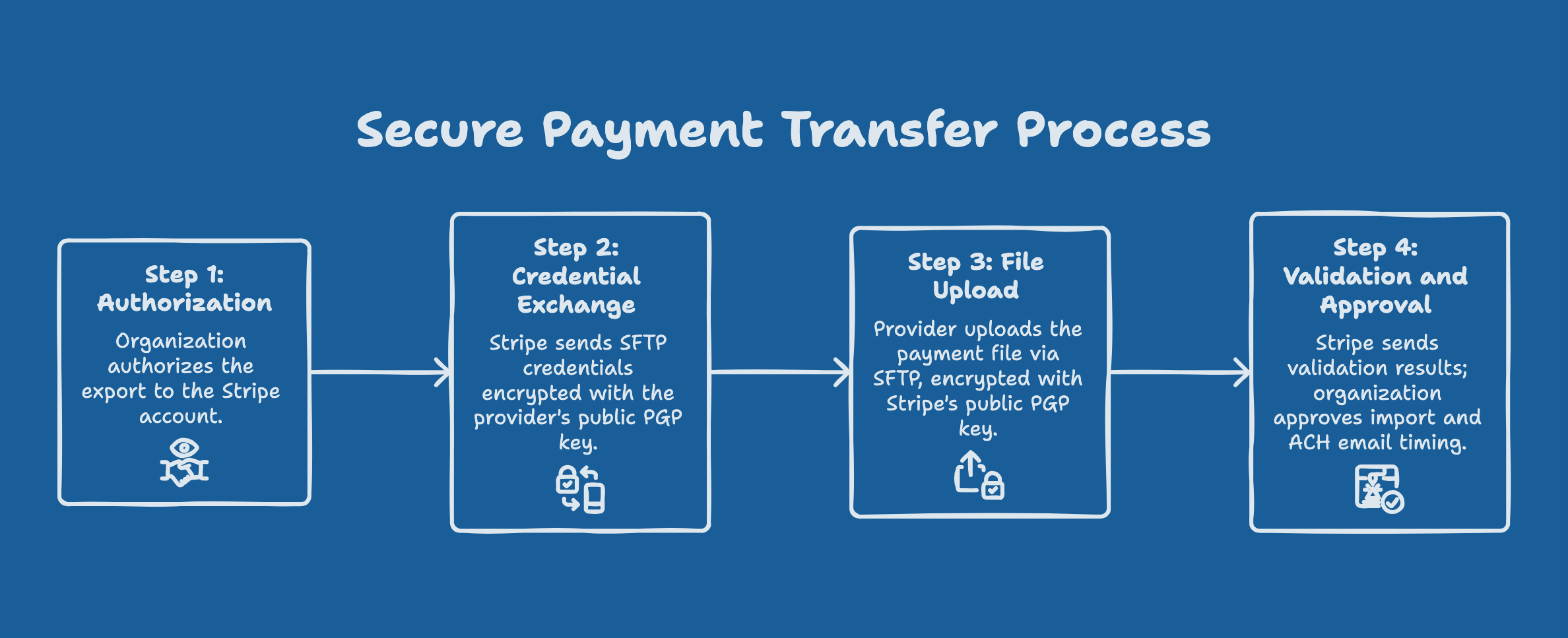

Two different keys protect the exchange, and each has one job:
Your provider's public PGP key encrypts the SFTP credentials. The provider's export team gives Stripe its key, and Stripe uses it to send the login details securely to that team. Keeping this exchange directly between your provider and Stripe is the preferred arrangement. Where the provider cannot supply a key, Stripe can deliver the password to a mobile phone instead.
Stripe's public PGP key encrypts the export. Your provider encrypts the payment file with Stripe's current public PGP key, using the key and fingerprint shown on Stripe's page, and uploads it following Stripe's SFTP instructions.
The file follows Stripe's format. The provider follows Stripe's payment-file requirements for each payment type. Ask it to preserve source identifiers and leading zeros in account and reference fields.
You record the handoff. Add the expected upload date, record counts and the provider's upload confirmation to your migration record.
Done when: the provider has confirmed the upload date, record count and any excluded records. The upload places the file with Stripe. It is not approval to run the import; that decision comes next.
Review the payment import before approval
Stripe validates the uploaded file and returns a summary. Review it and approve only the records you intend to import. Three points are worth settling first:
Existing Stripe customers. If donors already exist in Stripe, Gratona can prepare an existing-customer mapping CSV with
old_customer_idandstripe_customer_id, so each method attaches to the right customer.Default methods. Check that an older imported method will not replace a newer one as a donor's default.
ACH email timing. Importing ACH as PaymentMethod records with customer email addresses triggers Stripe mandate-confirmation emails independently of Gratona, so pausing Gratona's emails does not hold them. Follow Stripe's ACH import instructions and agree the supported format and notification timing with Stripe. If all donor emails must stay paused, hold the import until Stripe confirms the agreed handling. Keep valid donor email addresses and agree the notification handling with Stripe.
Add your approval of the validation summary and the agreed ACH handling to your migration record. They authorize the import only; starting collections and sending Gratona messages are separate approvals.
Match each method to its donor
After Stripe completes the import, keep its source-to-Stripe mapping file with your migration record. On the same-account route, start here with the customers and methods already in the connected account; after an account copy, use its destination-ID mapping.
Match each source customer and payment reference to the receiving Stripe customer and method, then to the Gratona Donor ID and commitment, using IDs rather than names.
To check a donor, open them in Gratona and review Payment Methods for the expected type and masked details.
If the imported method is not shown, ask Gratona to complete the mapping before you change the commitment.
A saved method changes nothing by itself: an External Processor commitment stays externally collected until you switch it at launch.
Timing and follow-up
Stripe says its migration team replies within three business days of intake. Imports typically take up to ten business days after valid data arrives, and larger or incomplete exports take longer. Your provider's export timeline is separate and can range from days to months, so ask the team handling your account for a date.
Keep the case number, owner, next action and expected date in your migration record. Follow up on the same case after the provider's promised date; if none was given, every two business days is a useful rhythm. That rhythm is our follow-up habit, not a provider response time. Allow time after the export for import approval, matching and schedule review.
Stripe references
While the transfer runs, continue with the record import and Review the donor experience before launch. When methods and records are both ready, continue with Launch and hand over your migration.