
Check three things. First, which soft-credit types are enabled under Relationship Giving Attribution. Second, whether soft-credit amounts were capped at each gift's remaining amount after refunds. Third, whether your export includes failed or pending donations that giving totals exclude. Giving totals on profiles and attribution views count qualified payments only: completed gifts with a positive net amount, with fully refunded gifts excluded and partial refunds counted at their net amount.
Review a supporter's DAF giving and check an apparent decline
Updated 3 weeks ago
Before you treat a quiet supporter as lapsed, review their full relationship giving: direct gifts plus donor-advised fund (DAF) grants recognized through soft credits. This guide shows how to compare two equivalent periods, see the latest personal and DAF support, review source totals, and check an apparent decline using donor profiles, the Stewardship Hub, and Reports.
How Gratona attributes DAF support
A DAF grant is one donation. The sponsoring charity, such as Fidelity Charitable, is the legal giver and keeps the donation record. The advising person receives a soft credit. Legal revenue, receipts, and tax reporting always come from the donation record alone.
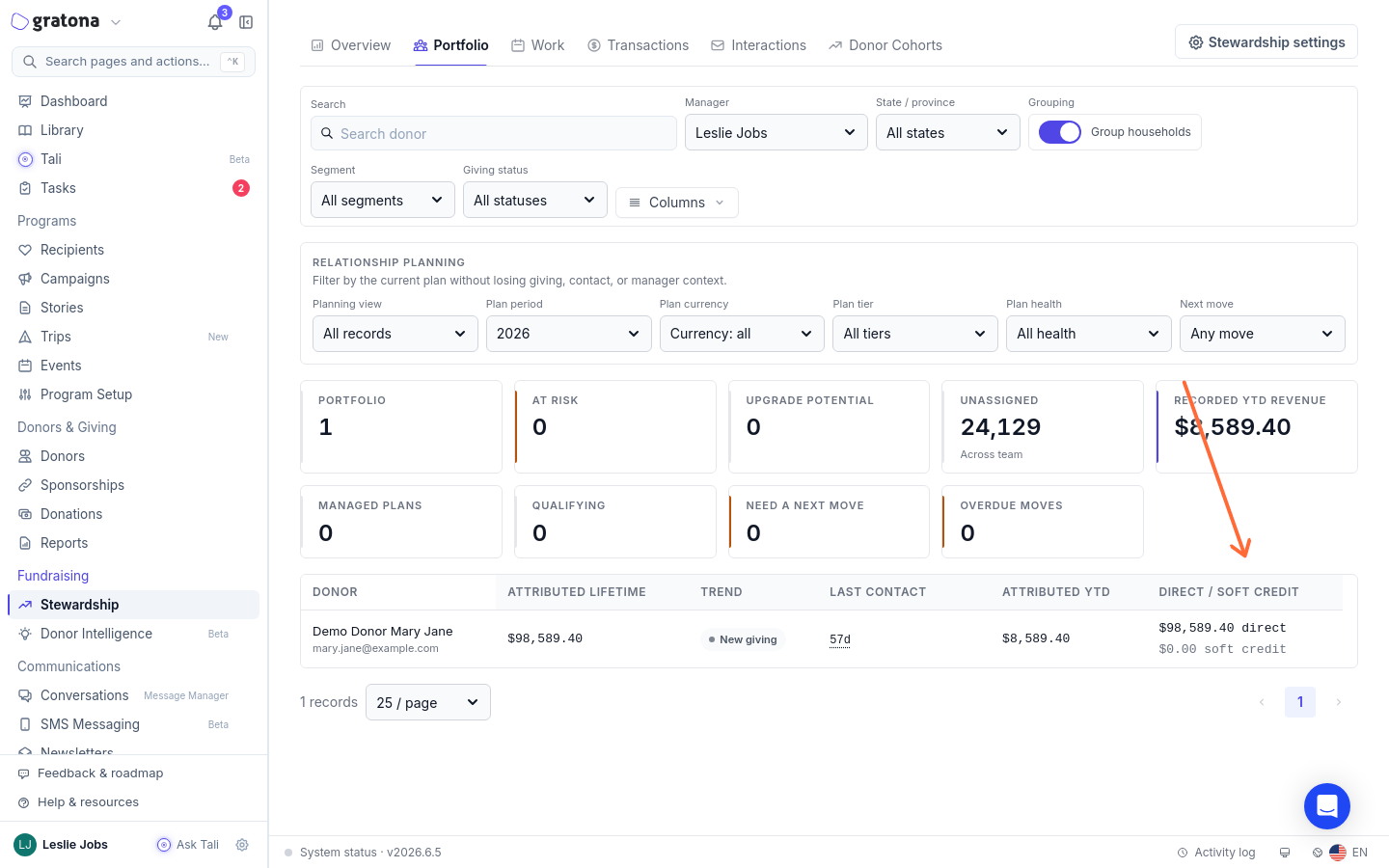
The Stewardship Hub combines direct gifts and eligible soft credits into attributed totals. The Portfolio table carries an Attributed lifetime column for each supporter. Open a row to open the supporter's profile drawer, where the Attributed lifetime, Attributed YTD, and Attributed gifts tiles show totals with their direct and soft-credit amounts, alongside Previous YTD, the same elapsed period last year, and Last attributed gift.
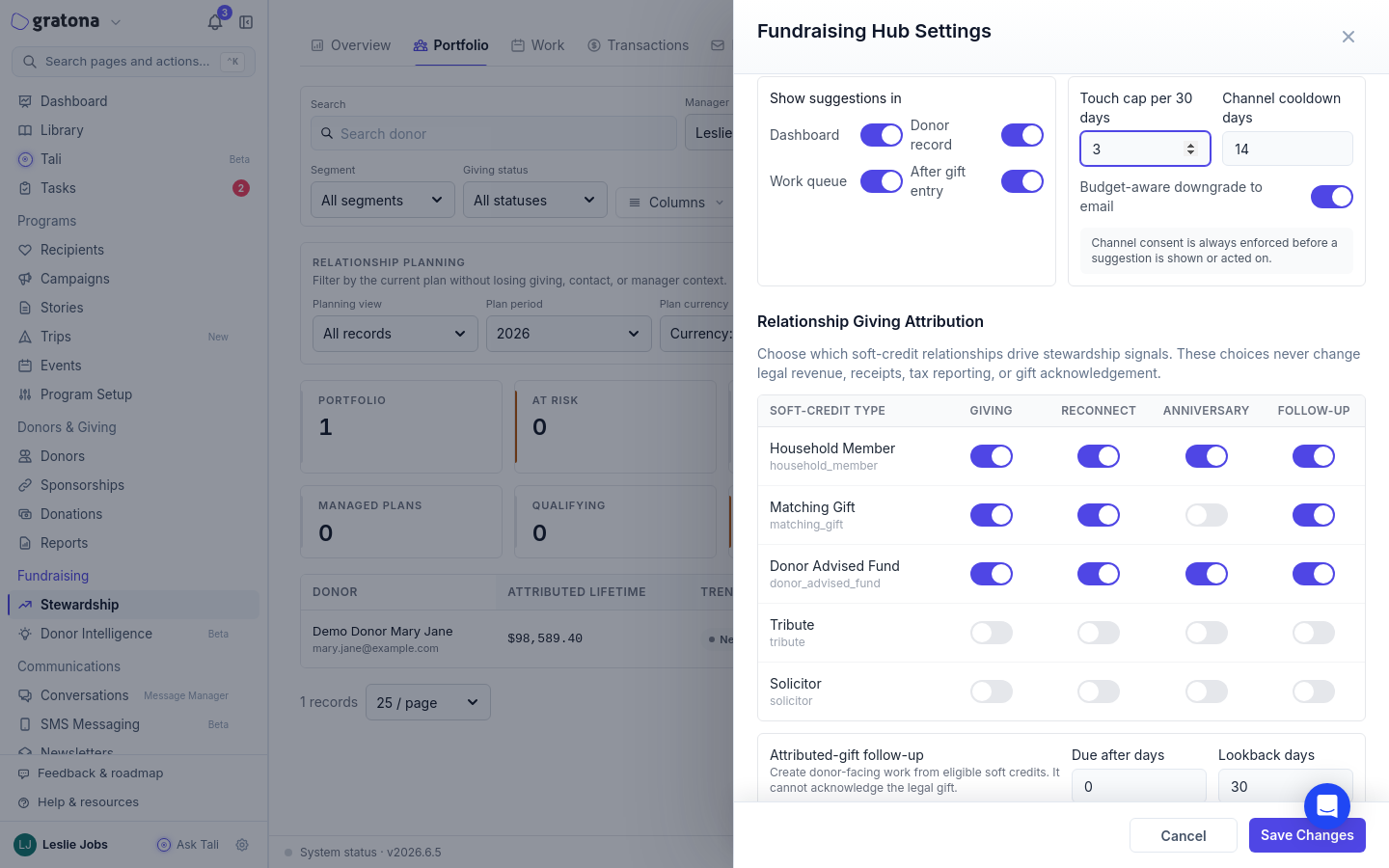
Which soft-credit types count is set in Fundraising Hub Settings under Relationship Giving Attribution. Donor-advised fund is on by default for the Giving, Reconnect, Anniversary, and Follow-up signals. Tribute and Solicitor are off by default, because those credits usually describe why a gift happened rather than the donor's own support.
Reports carry the same idea. On the Donors source, Fundraising YTD Total is the donor's giving this calendar year after refunds, combining direct gifts and soft credits capped at each gift's remaining amount. Fundraising Last Gift Source shows whether the donor's latest credited gift was direct or a soft credit. Both fields work as columns and as filters.
Attribution choices affect stewardship views only. They never change legal revenue, receipts, tax reporting, or gift acknowledgement.
Attributed giving is narrower than recognition. The donor profile's Soft Credit Total and Influenced Total can include credit types excluded from relationship-giving attribution, so a solicitor or tribute credit can appear there without increasing attributed giving, which counts only soft credits that are eligible under your Relationship Giving Attribution policy and any row overrides. Attributed giving also excludes in-kind donations and unqualified or fully refunded records; other summaries, such as profile giving or tax views, are calculated separately, so check each summary's own basis.
Worked example: the Smith family, Jan 1 to Sep 17
Compare equivalent date ranges rather than whole calendar years when the current year is incomplete. The Smiths, compared Jan 1 to Sep 17 in two consecutive years:
Last year: $6,000 of personal, direct gifts.
This year: a $1,000 personal gift on February 1, a $4,000 Fidelity Charitable grant on June 15, and a $2,000 National Christian Foundation grant on September 10, for $7,000 of recognized support.
Recognized support is up $1,000, about 16.7 percent, even though personal giving fell from $6,000 to $1,000. The Jan 1 to Sep 17 window makes this example illustrative; the comparison itself is automatic, because the Portfolio compares attributed year to date with the same elapsed period last year.
Each grant stays one donation. The $4,000 Fidelity Charitable grant is one donation with a $4,000 soft credit to the Smiths, and the $2,000 National Christian Foundation grant is a separate donation with its own credit. Never add a second donation for the Smiths, and never let a household rollup duplicate a grant: the organization received $7,000, once. Household views can combine members of one household, but a grant the household advised is still credited a single time.
Recognition totals describe relationships, not revenue. Do not sum overlapping recognition totals and report the result as organization income.
This year the Smiths used both sponsors: a Fidelity Charitable grant and a National Christian Foundation grant. A change in that mix, or a future move to a new sponsor, is a change of channel, not a new supporter and not a lapse.
Compare two equivalent periods
The Portfolio compares attributed giving automatically: Attributed YTD covers January 1 to today, and Previous YTD covers the same elapsed period last year. For the Smiths, that is Jan 1 to Sep 17 in both years.
Open Fundraising and select the Portfolio tab. If Attributed YTD or Direct / soft credit is hidden, use Columns to show them.
Find the Smiths' row and read Attributed YTD and the Direct / soft credit split.
Open the row to open the profile drawer. It shows Attributed YTD, Previous YTD, Last attributed gift, and the direct and soft-credit breakdown for each tile.
Open Trend calculation to see how the YTD comparison is computed.
Comparison-period controls elsewhere in the Hub, such as a custom period on Overview or Donor Cohorts, do not change the Portfolio's YTD comparison; it always compares year to date with the same elapsed period last year.
Reconcile manually when you need exact sums
Keep one consistent scope: the same date range, such as Jan 1 to Sep 17 in both years, the same payment status and currency, and the same attribution policy and row overrides. Stewardship support is not limited to tax-deductible gifts. Add the supporter's direct gifts at their net amount after refunds, plus their eligible credits on other givers' donations, with each credit amount capped at the parent donation's remaining net. Group the results by original Donation ID, once per person or household, and count each household gift once. Do not replace a partial credited amount with the full parent net. Never total overlapping recognition amounts as organization revenue. Verify what an export actually contains before you rely on it; an export is not a substitute for checking that credits on other givers' donations are included.
See the latest personal and DAF support
On the Portfolio, check the Direct / soft credit column to see how the Smiths' lifetime support splits between direct gifts and soft credits.
Open the Smiths' donor profile and select Transactions > Credits Summary. Each card lists the credit kind, the type such as Donor Advised Fund, the amount, the date, and any notes, so you can see that the most recent support was the $2,000 National Christian Foundation grant from September 10.
In Reports, add Fundraising Last Gift Source to a Donors report to see direct or soft credit for every supporter at once, and filter it to find people whose latest credited gift was a soft credit. A soft-credit result does not prove a DAF grant or current support: it could be a matching gift, a household member, or an older gift. Open the gift and check its date, the legal giver, and whether the credit type is Donor Advised Fund before you conclude anything about channels.
Review source totals
Open Reports and create a report from the Donations source. One row is one donation record, including failed, refunded, and pending records unless you filter them out.
Start from the built-in Soft credit donations template, or add the Soft Credits, Original Donor, and Soft Credit Type columns to see who was recognized on each giver's donation.
Use the Result filter for payment status and Tax treatment for deductible status. Built-in templates also exist for Refunded donations and Failed or non-successful donations.
Read attributed fields with their scope in mind. On the Donors source, Fundraising YTD Total and Fundraising Last Gift Source are not recalculated by the report's date range: the range controls which donor rows appear but does not redefine either field. Fundraising YTD Total is a calendar-year-to-date metric, while Fundraising Last Gift Source identifies the most recent qualifying attributed gift, which can predate this year. Soft credits count only when they are eligible under your organization's Relationship Giving Attribution policy and any row overrides. One Donors-source row is one donor, not an automatic household row, and overlapping attributed totals are not organization revenue.
Check an apparent decline or lapse
Work these checks in order before a lapsed appeal or reactivation task.
Open the supporter's Portfolio row and open the profile drawer. Compare Attributed YTD with Previous YTD, the same elapsed period last year.
Check Fundraising Last Gift Source. A soft-credit result is a prompt to look closer, not proof of a DAF grant: open the gift and check its date, the legal giver, and the credit type.
Check whether the sponsor mix changed, as in the Smith example. New or different sponsors are a change of channel, not a lapse.
Open the giver's donation from the Donations Table and confirm the grant carries a soft credit to the supporter. If the grant letter names the supporter and no credit exists, add one to the original donation.
Read Donor Cohorts with care. Cohort classification compares direct donations between periods, so a DAF-only year can register as lost giving even while attributed support held steady; Portfolio attributed trends compare Attributed YTD with Previous YTD instead. Confirm on the attributed views before you act.
My attributed totals do not match my export
The DAF grant does not name an advisor
Use the grant letter. A fund name alone does not identify a person. If the letter names a specific advisor, add the soft credit to that person. If it shows only the fund name, record the fund name and grant reference in the donation's Notes and add the credit only once you can verify the advisor. If the grant is anonymous or omits the advisor, record only what the letter shows and never invent one. Not every grant letter names the fund, the advisor, and any restrictions, so review each letter on its own. Missing advisor or fund details belong on a reconciliation list, separate from cultivation lists.
Was this helpful?
Was this helpful?