
APPEALS & DONOR CHOICE
One Email Means Every Team
Make an email-frequency promise every sender can keep.
Write a fundraising-email promise with exact dates, apply it to every sending queue and check the delivery log to confirm it held.
Go to the messages and worksheet ↗The decision
The finding in its setting
Damgaard and Gravert (2018) emailed about 43,500 people on DanChurchAid’s list. One version added a postscript promising a single email in the next three months, where the usual pattern was monthly. Over the first three days, 0.30% of that group unsubscribed against 0.49% for the usual email: 0.19 percentage points lower, or about 39% fewer in relative terms. Giving didn’t differ significantly. Donors who gave monthly by automatic payment weren’t included.
The tested promise covered email in general. A promise about fundraising email only, like the one below, is narrower and wasn’t what the study tested. The study doesn’t show that quarterly contact suits everyone or that fewer emails raise more money.
One promise, many senders
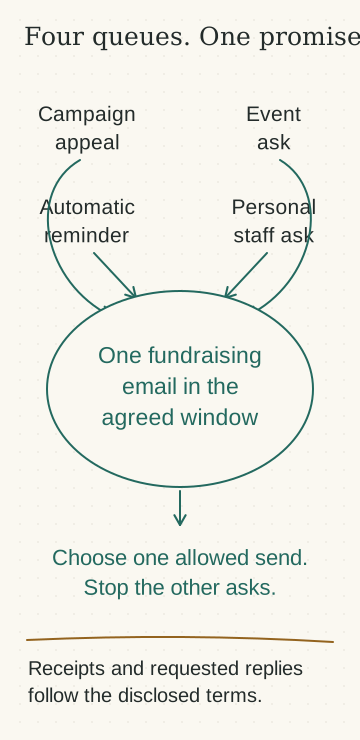
A development team can send one appeal and still break the promise, because the events team sends a ticket invitation, a relationship manager sends a personal ask and the platform sends an automated reminder. Each team sent one email. The donor received four.
Classify every message by its purpose, whatever the sending team calls it. Then check each donor’s delivery history across every system that can send. A combined contact history tells you whether the promise held; a count of templates per team doesn’t.
| Message | Usually sent by | Counts as fundraising? | Why |
|---|---|---|---|
| Appeal or appeal reminder | Development, automation | Yes | It asks for a gift. |
| Ticket invitation for a fundraising event | Events | Yes | It asks for money for the organization. |
| Personal email asking for a gift | Relationship manager | Yes | The sender’s relationship doesn’t change what it asks for. |
| Newsletter with an appeal section or donate button | Communications | Yes | The request is part of the message. |
| News-only update | Communications | No, if it has no request and no giving link | Write down what news-only means for your team. |
| Automated renewal or lapse reminder | Platform | Yes | It asks for a gift on a timer. |
| Gift receipt | Payments | No, if it holds only the receipt | Check the template for added appeal text first. |
| Reply to a donor’s message | Anyone | No, while it answers what they asked | Adding an ask makes it a solicitation. |
| Logistics for a ticket already bought | Events | No, if logistics only | Auction or pledge promotions count. |
Writing the promise
Use exact dates, name the kind of email covered and list what will still arrive. If the donor’s own words were broader, such as “just one email please,” either honor that for all email or ask what they meant before applying a narrower promise.
Keep each preference with its source and date, apply the latest one and keep the history. A preference outranks anything staff have said they’ll send. If a relationship manager offered to send a proposal and the donor has since chosen fewer fundraising emails, the proposal becomes the one email or waits until the period ends.
The study
- The hidden costs of nudging: Experimental evidence from reminders in fundraising
2018. The frequency comparison is one of three versions in the second experiment. Monthly automatic-payment donors were excluded.
Worked case
The worked cases and templates use invented people and organizations.
Ruth’s preference, and what was already scheduled
Cedar Valley Hospice’s preference page lets donors choose “One fundraising email between November 1 and January 31.” Ruth Adair, who has given every December for six years, chooses it on October 20 and receives the confirmation below. Ruth’s record also shows a September conversation in which Dan, a relationship manager, offered to send details of the family room renovation in November, and Ruth said that would be fine.
On October 23, Keisha, the operations manager, pulls every message scheduled to reach Ruth between November 1 and January 31 from every system that can send email.
The confirmation Ruth received
Sent automatically when the preference is saved. Keisha checked the wording against what each queue can honor when the preference page was set up.
| Date | Message | Queue owner | Fundraising? | Decision |
|---|---|---|---|---|
| November 12 | Winter concert ticket invitation, proceeds to the hospice | Paul, events | Yes | Suppress |
| November 18 | Family room renovation proposal, with a request | Dan | Yes | Send. This is the one fundraising email. |
| November 19 | Monthly news update | Lin, communications | No, news-only edition | Send the news-only edition |
| December 1 | Year-end appeal | Keisha, development | Yes | Suppress |
| December 14 | Automated renewal reminder, 12 months after Ruth’s last gift | Keisha, platform rule | Yes | Suppress |
| December 17 | Monthly news update, led by the year-end appeal | Lin | Yes | Suppress |
| December 29 | Automated year-end reminder | Keisha, platform rule | Yes | Suppress |
| January 21 | Monthly news update | Lin | No, news-only edition | Send the news-only edition |
| Any date | Gift receipt | Payments | No | Send as usual. The receipt template has no appeal text. |
| Any date | Replies to messages from Ruth | Whoever Ruth writes to | No, unless an ask is added | Send |
How Keisha resolved it
Dan’s proposal becomes the one fundraising email. Ruth had agreed to receive it, it’s the most specific of the six fundraising messages scheduled, and it comes from someone Ruth knows. Keisha asks Dan to keep it to one message. If Ruth replies with questions, Dan answers them, but there’s no follow-up nudge unless Ruth asks for one.
Lin’s platform can’t remove the appeal section for individual readers, so Lin sets up a news-only edition, with no appeal and no donate button, for donors with this preference. In December, when the appeal leads the newsletter, the edition is suppressed for them.
Keisha adds Ruth to the suppression list in every system that sends: the email platform, the events platform and the automation rules. Each queue owner confirms in writing that it’s applied. Dan’s calendar entry now reads “Ruth: one fundraising email agreed, November 18.”
The audit
Keisha reads delivery events every Monday during the period, and again on February 2. Drafts and scheduled sends don’t count. Keisha reads delivery logs from the email platform, the events platform and the CRM’s record of staff email, and asks relationship managers to confirm anything sent outside those systems.
| Date delivered | Message | System | Fundraising? | Within the promise? |
|---|---|---|---|---|
| November 18 | Dan’s renovation proposal | CRM staff email log | Yes | Yes, the one fundraising email |
| November 19 | News update, news-only edition | Email platform | No | Yes |
| November 24 | Dan’s answer to Ruth’s question about naming the room | CRM staff email log | No, a reply Ruth asked for | Yes |
| December 3 | “Last few concert tickets” reminder | Events platform | Yes | No |
| December 11 | Receipt for Ruth’s gift of $400 | Payments | No | Yes |
| January 21 | News update, news-only edition | Email platform | No | Yes |
The December 3 reminder came from a weekly contact import into the events platform, and the import didn’t carry suppressions. Keisha finds it on the December 7 check. Ruth received two fundraising emails instead of one. Keisha fixes the import, checks the other donors with the same preference and finds eleven more who received the reminder, and tells Paul and Dan that day.
Ruth’s preferences still allow email, so Keisha sends a short apology with no mention of the concert or the appeal and no request of any kind. For the one affected donor who had since asked for no email at all, Keisha fixes the cause and records the breach without writing.
Ruth’s December gift doesn’t restart anything. The receipt went out as usual and the promise ran to January 31. The February 2 audit found no further breaches.
Keisha’s apology
Sent December 7 to donors whose preferences allow email, after the cause was fixed.
Put it to work
Your promise wording
Use it on the preference page and in the confirmation. Keep only the lines every queue can honor.
Your queue register
One register per promise. Every queue owner confirms suppression in writing, and again after any import or list rebuild.
Your delivery audit
Read delivery events, not drafts or schedules. Run it on a fixed day each week and after the period ends.
If you broke the promise
Send only if the donor’s preference allows email from you, and only after the cause is fixed. If they asked for no contact, fix it and record it without writing. Include no request.
The contact frequency promise kit
The promise wording, queue register, delivery audit and apology in one file, for the meeting with every team that sends email.
Download the promise kitExceptions
- The donor’s words were broad, such as “just one email.” Treat it as all email, or ask what they meant before narrowing it.
- The donor asks for no email at all. That replaces the fundraising promise at once, including news. Ask finance how receipts will reach them through a channel they allow.
- The donor gives during the period. Send the receipt as usual. The gift doesn’t reset or extend anything.
- The donor writes asking about an appeal. Answer it and record it as a conversation the donor started. Don’t follow up with asks they didn’t request.
- Two records disagree. Use the latest preference stated by that person, and keep both with their sources and dates.
- A staff member is sure the donor would welcome another ask. Don’t send it. The promise stands until the end date unless the donor changes it.
Who owns it
One person owns the register and the audit, usually in operations. Each queue owner confirms suppression in their own system, and confirms again after any import or list rebuild. Relationship managers log personal emails in the CRM or tell the register owner, because personal email often bypasses the systems the audit reads.
Check that it held
- For each donor with the preference, fundraising emails delivered in the period match the promise, counted from delivery events.
- Every breach has a cause, a fix, a date and a record of what the donor was told, or why they weren’t.
- Suppression was rechecked after every import or list rebuild in the period.
- After the end date, each donor’s messages follow their earlier preferences unless they chose something new.
Continue with the research
Mette Trier Damgaard and Christina Gravert ran email experiments with DanChurchAid, including a version that told recipients they would hear less often.
In the second experiment, find the version with the low-frequency postscript and compare its wording with the usual email. A footnote explains why unsubscribes were counted over three days. Note which donors were left out of the sample.
The hidden costs of nudging: Experimental evidence from reminders in fundraising ↗
Mette Trier Damgaard and Christina Gravert
Other decisions before the send
The appeal needs urgency. The facts are still being checked.The Deadline Has to Be Real
Write an urgent appeal your program and finance teams can stand behind.
We want to ask donors which program matters to them.What Does This Box Promise?
Ask donors what matters and make clear what their answer changes.
A donor said they plan to give. What do we record now?The Gift That Hasn't Happened
Follow up on an intention without counting it as money.
Someone wants to add a giving link to the thank-you.Thanks, Then Another Ask?
Decide whether an invitation belongs in this donor’s thank-you.