
Record a received DAF grant
Updated 7 days ago
Use Giving source: DAF grant on the donation form to record a donor-advised fund grant your organization has already received. This records money that arrived. It does not request a grant, connect to a DAF provider such as DAFpay or Chariot, track pending grants, or charge the gift again.
Before you start
Have the grant letter or remittance in hand: it names the sponsoring charity and any advisor, fund, or anonymity instructions. Recording the donation needs donation access; creating a new donor from a picker needs donor-management permission.
DAF grants accept received payment methods only: Cash, Check, Wire Transfer (including incoming EFT), and External Processor. Card, ACH, PayPal, and in-kind methods are not offered for this source. A received payment has one giving source across all of its allocations, including split gifts.
Record the grant
From a donor profile, select Add donation.
In Giving source, select DAF grant.
In DAF sponsor, search for and select the sponsoring charity. The sponsor is the financial owner of the donation.
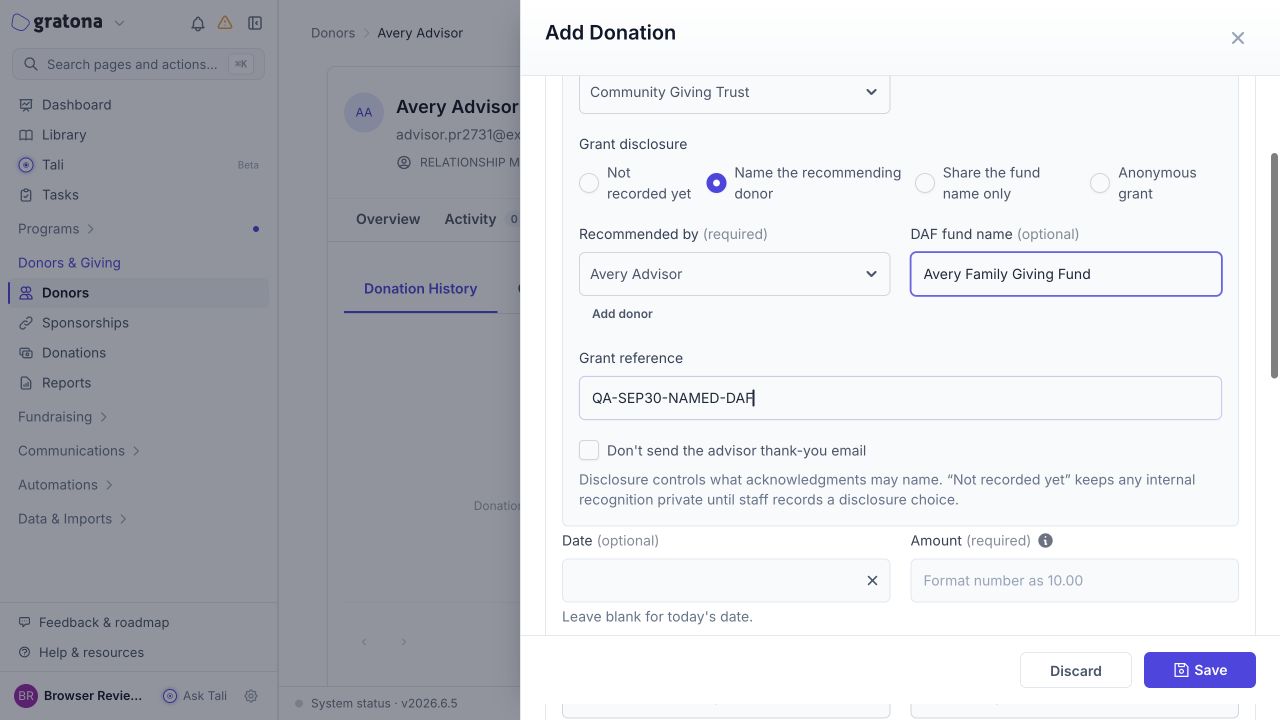
Under Grant disclosure, choose how the grant identifies the advisor.
Enter the amount, donation date, and designations, and select a received payment method.
Optional: for each allocation, select Apply to sponsorship to cover periods of an existing commitment. See Apply a received gift to sponsorship coverage.
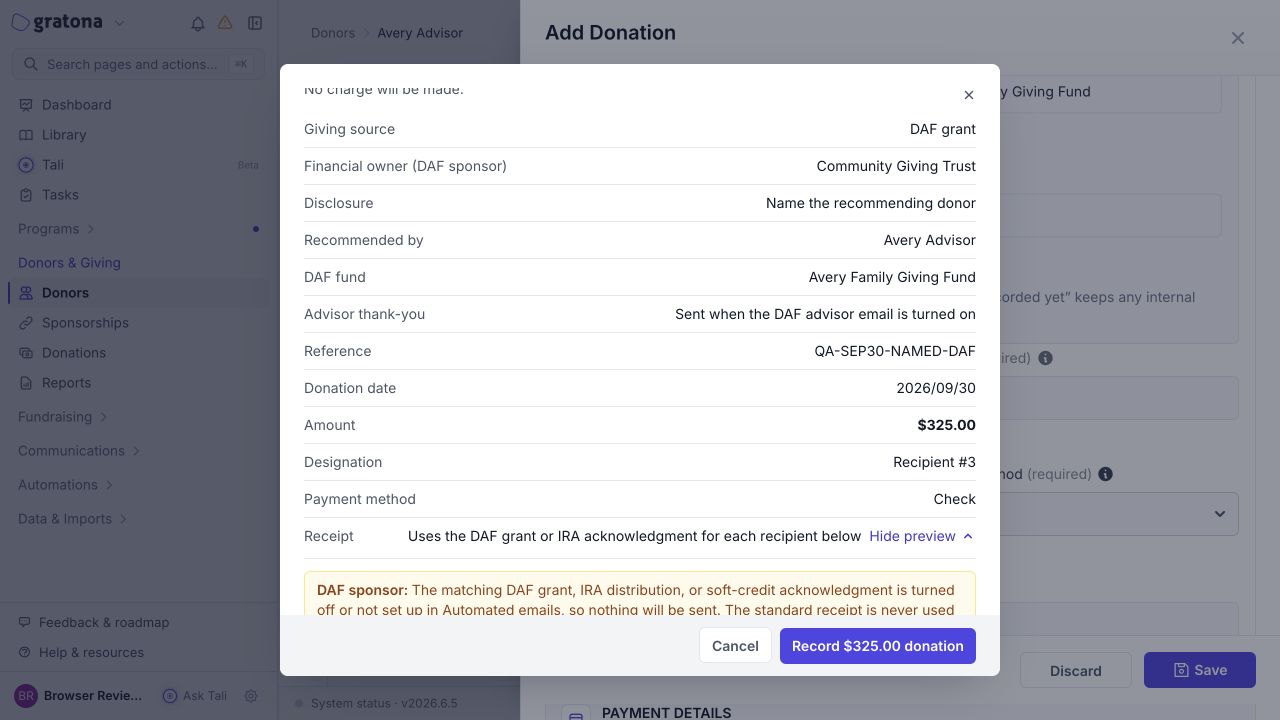
Select Save, review the Confirm donation summary, and confirm.
The confirmation summary shows the giving source, the financial owner, the disclosure with the advisor or fund details, any reference, the allocations, any sponsorship coverage, and the acknowledgment plan.
Choose the grant disclosure
Grant disclosure controls which identity fields the form shows and what the acknowledgments may include.
Disclosure option | Required fields | Acknowledgments may show |
|---|---|---|
Not recorded yet | DAF sponsor | Neither identity |
Name the recommending donor | DAF sponsor, Recommended by | The advisor, and the fund name if entered |
Share the fund name only | DAF sponsor, DAF fund name | The fund name, never the advisor |
Anonymous grant | DAF sponsor | Neither identity |
Not recorded yet is a working state for a grant whose details you have not confirmed. Anonymous grant means the gift is intentionally anonymous; the two are recorded differently even though neither shows an identity. Choosing Not recorded yet or Anonymous grant clears any fund name you entered.
A reusable fund name is not a grant reference. DAF fund name is the fund's standing name, such as Smith Family Fund. Grant reference is the identifier for this specific grant, such as the grant or check ID.
Changing the disclosure away from Name the recommending donor clears the advisor and any selected sponsorship coverage. When coverage is already selected, Gratona asks you to confirm the change first.
Select or add the DAF sponsor
The DAF sponsor picker groups results in up to three lists:
Your institutions: giving-institution records your organization already uses.
Existing organizations: ordinary organization records that match your search. Selecting one asks whether to convert it to a giving institution and keep its history; confirm only when that is what you intend.
Directory: a starter directory of known DAF sponsors. Selecting a directory entry links or creates the institution record. This is not a provider connection: Gratona does not contact the sponsor or receive grants through it.
Use the Add institution option when no result matches. A giving institution is an organization record used for fields such as DAF sponsor and IRA custodian. It is not an ordinary supporter record and does not receive donor portal access. Do not mark a church or company giving its own funds as an institution merely because it is an organization.
Add the advisor
Recommended by appears when Grant disclosure is Name the recommending donor. The advisor can be an individual or an organization. If the advisor has no record yet, select Add donor in the picker: it opens the Add Donor form, and the new record is selected for the gift without saving the donation. Add donor appears only when your role can manage donors and a donor form is available.
After you save
The donation is recorded once, owned by the DAF sponsor: the sponsoring institution receives the hard credit. Recognition follows the individual you select under Recommended by, not whichever donor profile the form was opened from. When Grant disclosure is Name the recommending donor and an advisor is chosen, each allocation automatically receives a donor-advised-fund soft credit for that advisor, so the advisor is recognized without a second donation or a manual duplicate credit. Fund-only, anonymous, and not-recorded grants create no advisor credit; never invent an advisor to complete the record. Gift-level Grant disclosure does not change the donor's global privacy preferences. For how credits appear on profiles, see Soft Credit.
Acknowledgments
DAF grants use a dedicated DAF grant receipt variant, and the advisor thank-you uses the receipt's soft-credit variant. Newly created DAF and IRA/QCD variants start disabled, and the advisor thank-you also requires the Soft Credit variant to be configured and enabled. The parent Donor Payment Receipt template in the applicable email set must also exist and be enabled; enabling only a variant is insufficient when the parent receipt is disabled. Review and enable the required variants in Automated email before you rely on email for these gifts. See Auto Emails.
If a required variant is missing or disabled, that acknowledgment is not sent; other independently eligible acknowledgments are not necessarily prevented. The standard receipt is never used as a fallback. The advisor thank-you applies only when Grant disclosure is Name the recommending donor and an advisor is selected. An email address, recipient email preferences, suppression, and per-gift opt-outs also affect delivery, so check the confirmation acknowledgment plan.
Two opt-outs are independent: Don't send the DAF grant acknowledgment to the sponsor, and Don't send the advisor thank-you email.
When the required acknowledgment variant is available and can render, an owner without an email address can use Print acknowledgment from the confirmation preview. Printing is manual and does not send email.
Edit an existing gift
To reclassify an existing gift, open it from the Donations Table and choose to edit it. Use Giving source to change the source explicitly where permitted, and review the changed financial owner, source, and recognition before you save. Older gifts remain Direct until someone intentionally changes them, and the Giving source control is available when editing them. Ownership changes can be locked by integration mappings, recorded refunds, or reconciliation requirements. Do not delete or duplicate the gift to work around a lock.