
Apply a received gift to sponsorship coverage
Updated 7 days ago
Use Apply to sponsorship on a received donation to cover periods of an existing sponsorship commitment with money your organization has already received. The option is explicit for each allocation, Gratona never applies coverage on its own, and applying coverage never creates a new charge or a recurring schedule. It works for received Direct gifts as well as DAF grants and IRA/QCD gifts.
Before you start
Record the gift with the donation form open before you confirm. For DAF grants, see Record a received DAF grant. For IRA/QCD gifts, see Record a received IRA/QCD gift.
Only received payment methods work: Cash, Check, Wire Transfer (including incoming EFT), and External Processor. Coverage matches on three things:
The recognized person: the recommending advisor for a DAF grant, or the donation owner for a Direct gift or an IRA/QCD gift.
The designation of the commitment.
The currency.
A DAF grant without a named advisor cannot match a sponsorship. To pay a commitment directly with an ordinary payment, use the commitment's Add payment action instead; see How do I record one check for multiple sponsorships?
Apply an allocation to a sponsorship
The Apply to sponsorship selector appears when a matching schedule exists, and unavailable choices show the reason they are unavailable.
On the donation form, find the allocation you want to apply.
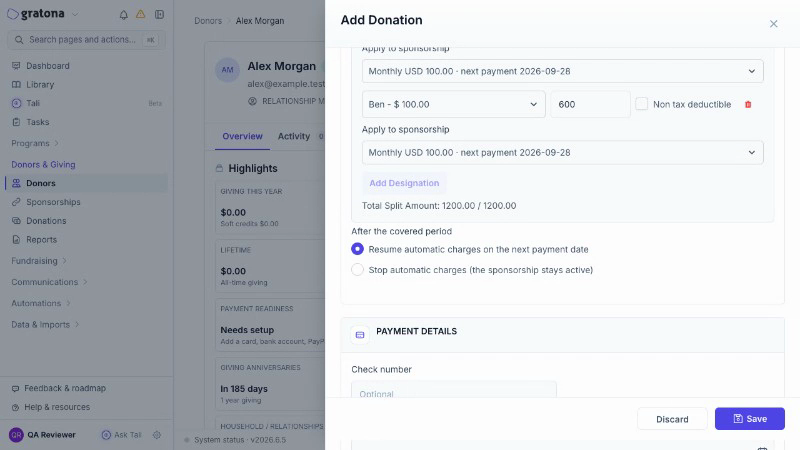
Select Apply to sponsorship for that allocation and choose the commitment.
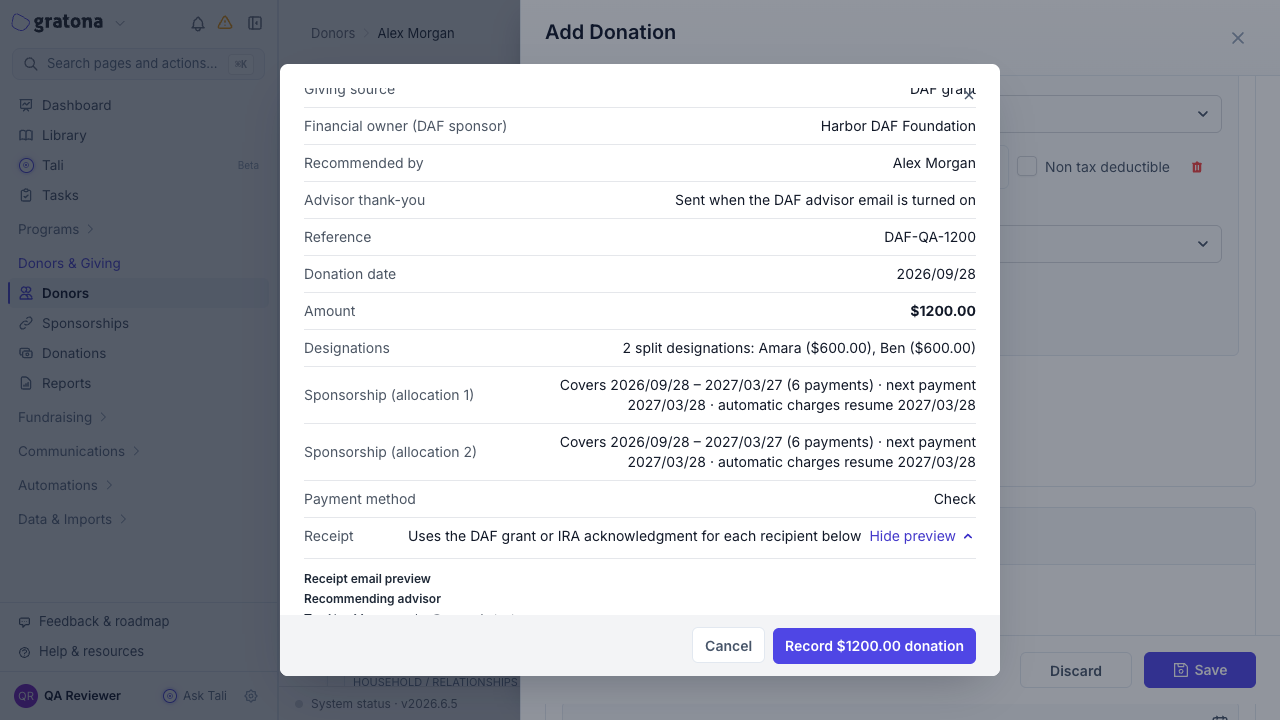
Review the paid-through and next-payment dates, and any earlier periods the commitment has not yet covered. Earlier uncovered arrears are not marked paid by this gift.
Check the remainder. A remainder stays part of the recorded gift; it does not create a partial extra period. For example, a $650 allocation toward $100 monthly periods covers six full periods, with $50 remaining part of the recorded gift. The covered dates come from the confirmation's dates; do not assume a calendar start.
If the commitment charges automatically, choose what happens after the covered period: Resume automatic charges on the next payment date or Stop automatic charges (the sponsorship stays active).
Resolve any conflict before you save: an external subscription or an in-flight payment on the commitment, or a stale schedule, must be resolved rather than bypassed.
Save the donation. The confirmation summary lists the coverage before the gift is recorded.
After the gift is recorded
The covered periods extend the commitment's schedule. Review the commitment when a covered gift is later edited or refunded: coverage may need staff review, and an edit or deletion does not always rewind the schedule automatically.
Gratona does not certify whether a DAF grant legally satisfies a pledge.