
Let donors give in honor or memory of someone
Updated 2 weeks ago
Let donors add a dedication to an individual gift with the built-in In Honor Of field. It is one optional text box for both honor and memorial messages.
Before you start
You need permission to manage settings to enable or disable the field.
Turn on the In-honor-of field
Use the checkout setting for the quick path, or the full settings editor when you are already working there. Both control the same field.
Open the program and go to Manage.
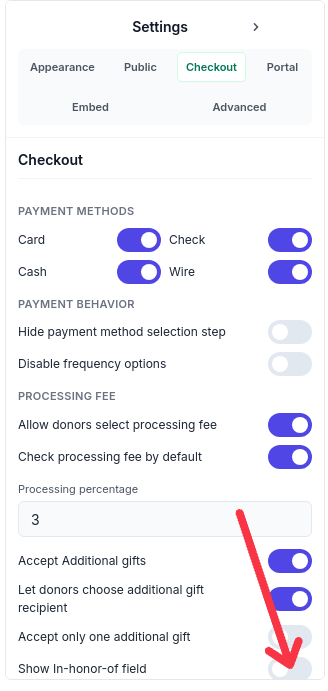
Select Website & Embed, then the Checkout tab.
Turn on Show In-honor-of field at the bottom of the Checkout settings list.
Save your changes.
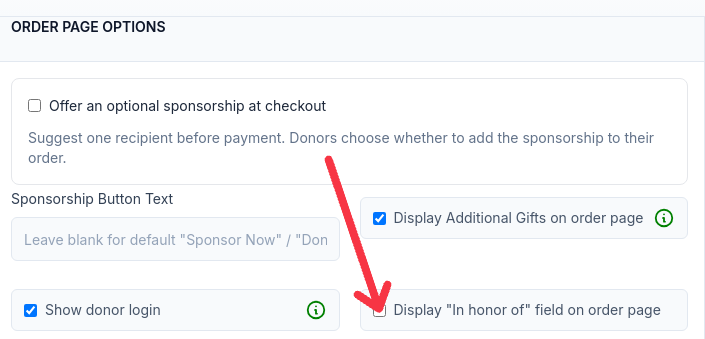
You can also set the same option in the full settings editor: check Display "In honor of" field on order page under Order Page Options (or Donation Page Options).
When enabled, the optional field appears on public donation and sponsorship checkout for programs using this setting.
If this program uses shared settings, check which change you are saving. Save a copy keeps your change on this program only, and Update Shared Setting applies it to every linked program.
What donors see
The box is free text, so donors decide how to word the dedication. The placeholder text is In Honor Of, and the same box works for both honor and memorial gifts:
For a birthday or celebration gift: In honor of Avery Ellis.
For a memorial gift: In memory of Jordan Ellis.
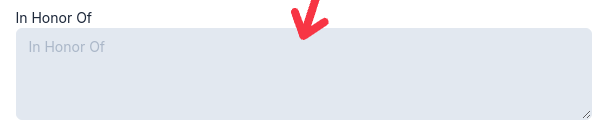
Find the saved dedication text
The text saves with the gift. Staff can view it in the In Honor Of column in the donation table or donation history. In the donation form, look for In Honor Of under Notes and acknowledgement when the field is enabled.
Use the donation table columns and filters to pull dedications for follow-up, as covered in Donations Table.
What the field does not do
There is no separate memorial selector, honoree email field, or automatic notification to an honoree or their family.
No Tribute soft credit is created automatically. To recognize someone with a soft credit, add one manually, as covered in Soft Credit.
If you need structure, such as a gift occasion choice or a separate tribute message, use donation custom fields instead, as covered in Add gift notes and other donation custom fields.