
Assign sponsors to multiple recipients funded separately
Updated last week
Use Assign sponsors on the Recipients worksheet to connect one supporter to several recipients, or choose a different supporter for each recipient. The relationships are marked Funded separately and have no payment schedule.
This is useful when a foundation supplies the money while individual people or families hold the sponsorship relationships. Record the foundation's received gift and allocate its funding separately; you do not need a 0.00 sponsorship.
Before you start
Create the recipients and supporter donor profiles first. A foundation can have its own organization donor profile.
You need permission to manage the selected programs.
In Programs > Program Setup > Program Settings, edit the profile the program uses, enable Allow sponsorships funded separately, and save. Programs sharing that settings profile are affected together.
Choose no more than 100 recipients per batch. Use smaller selections for a larger roster.
If the bulk actions are unavailable, check your permissions and ask support whether bulk sponsorship and funding tools are enabled for your organization. The program setting is also required for sponsor assignment.
One supporter for all selected recipients
Open Recipients, choose the program, and select the recipients in the worksheet.
Select Assign sponsors. The button shows the number selected.
Set Sponsor assignment to One supporter for all.
Search for and select the supporter.
Select Preview. Check every recipient, supporter, funding coverage, and result.
Resolve any reported problems, then select Assign sponsors.
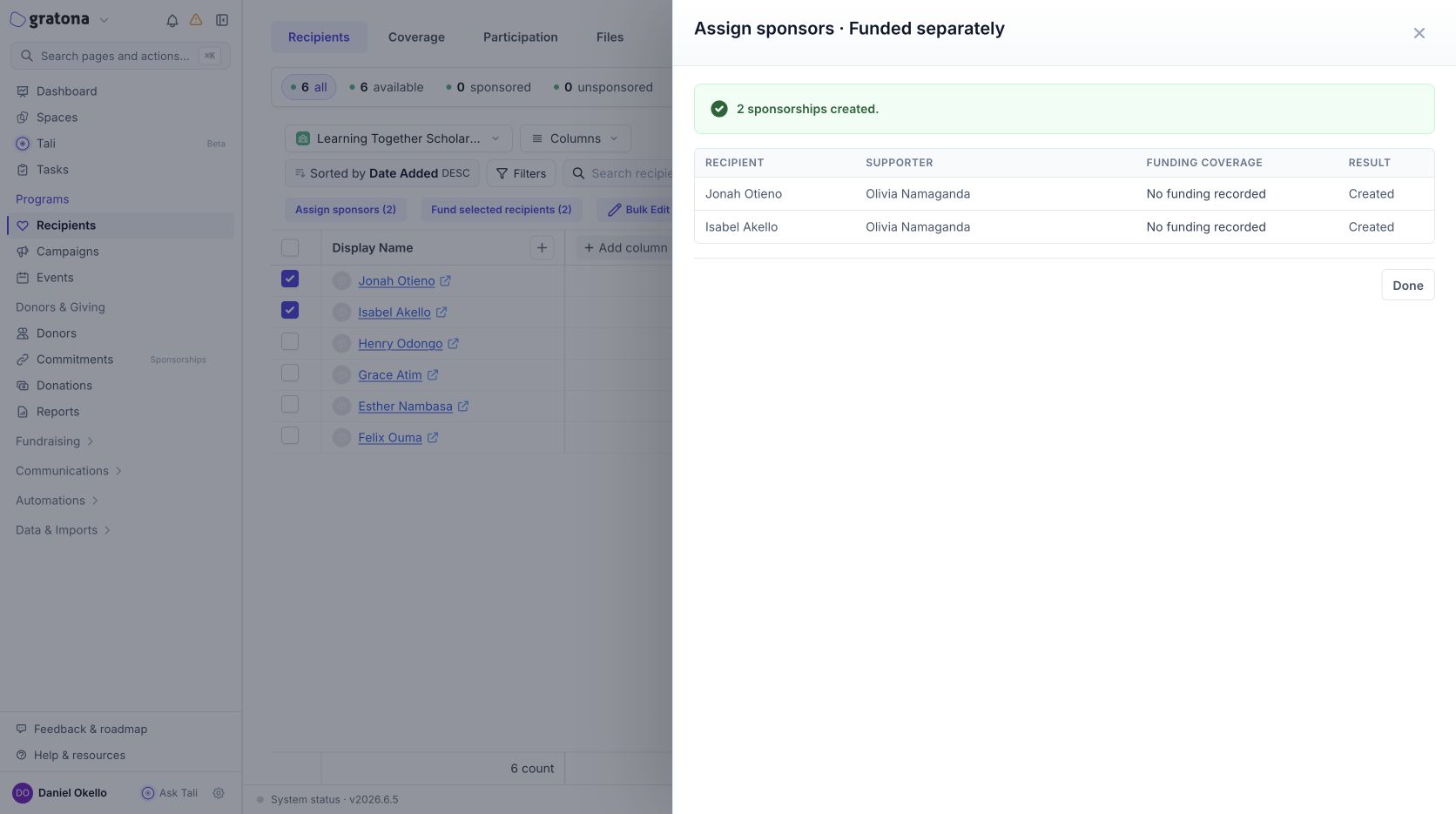
Check the saved created/already-assigned counts and select Done.
Choose a supporter for each recipient
Select the recipient roster and open Assign sponsors.
Set Sponsor assignment to Choose for each recipient.
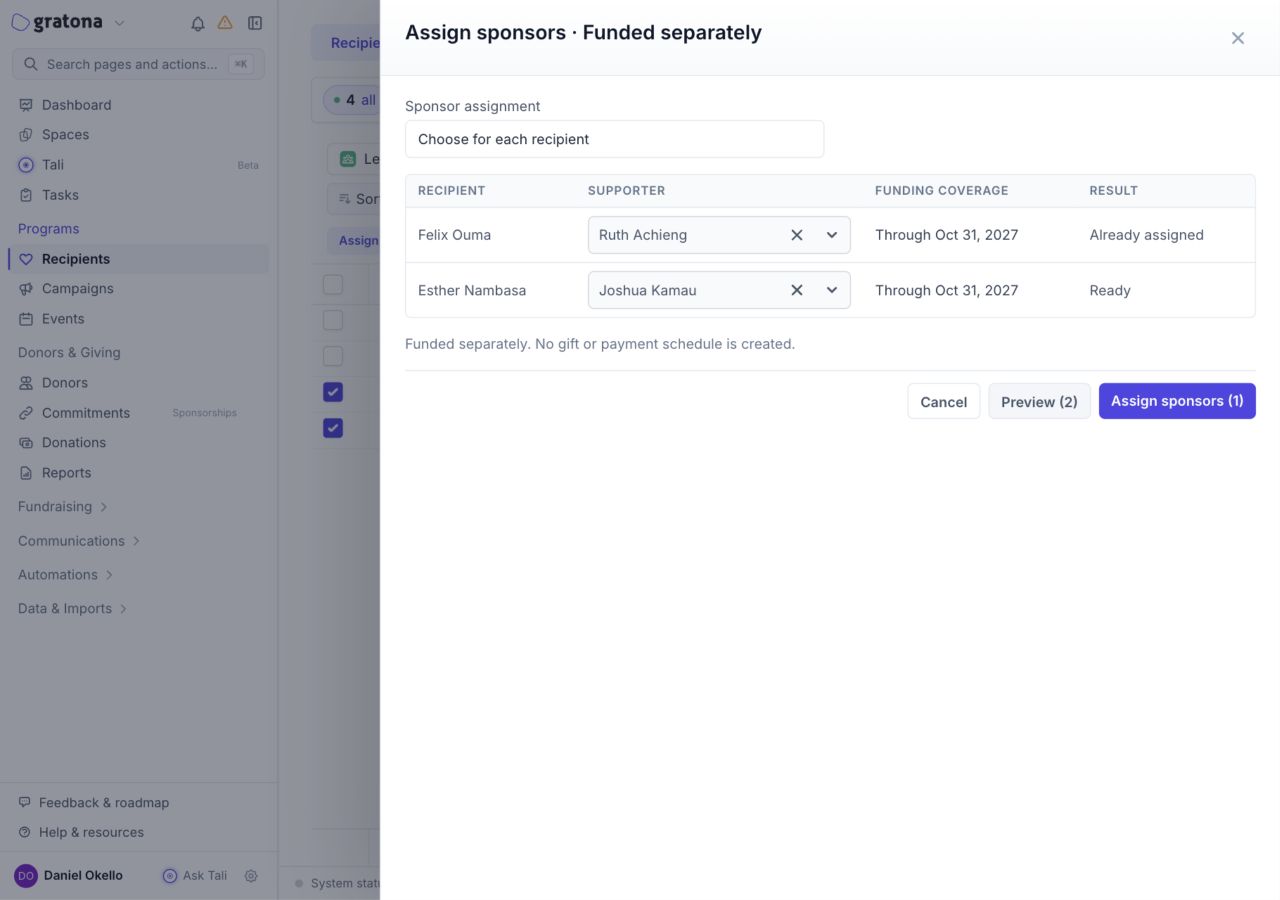
Search for and choose the supporter on each recipient's row. You can reuse the same supporter on several rows.
Select Preview, check the mapping, then select Assign sponsors.
Changing the assignment mode or a supporter requires a new preview. An active relationship already assigned to the same supporter is reported as Already assigned and kept, including an existing paid sponsorship. Restore an archived relationship through its normal restore action before retrying.
Understand the preview
Ready means the relationship can be created. Already assigned means that pair is retained. A row with a problem blocks the batch; correct the selection, program setting, supporter eligibility, or capacity problem and preview again.
No funding recorded does not prevent relationship creation. It means you still need to record or allocate the funding separately.
Verify the saved sponsorships
Open the supporter's donor record and review Current sponsorships. New relationships show the recipient's name, Funded separately, and No payment schedule. Funding information appears when coverage has been allocated.
This action creates no gift, payment method, payment schedule, or charge. It does not count as a recurring financial commitment on the supporter profile. Organization subscription sponsorship-unit billing still applies; see the sponsorship guide below.
Example screens
These examples use fictional demonstration records. The first shows a saved assignment to one supporter; the second shows a per-recipient preview with one existing pair retained.
Related guides
Fund multiple recipients from one foundation gift
Split one donation across multiple recipients or designations